CI/CD Pipeline: What It Is and How To Ship Reliably
A field-guide breakdown of CI/CD pipelines: stages, the CI vs CD vs Continuous Deployment distinction, DORA signals, and anti-patterns to avoid.
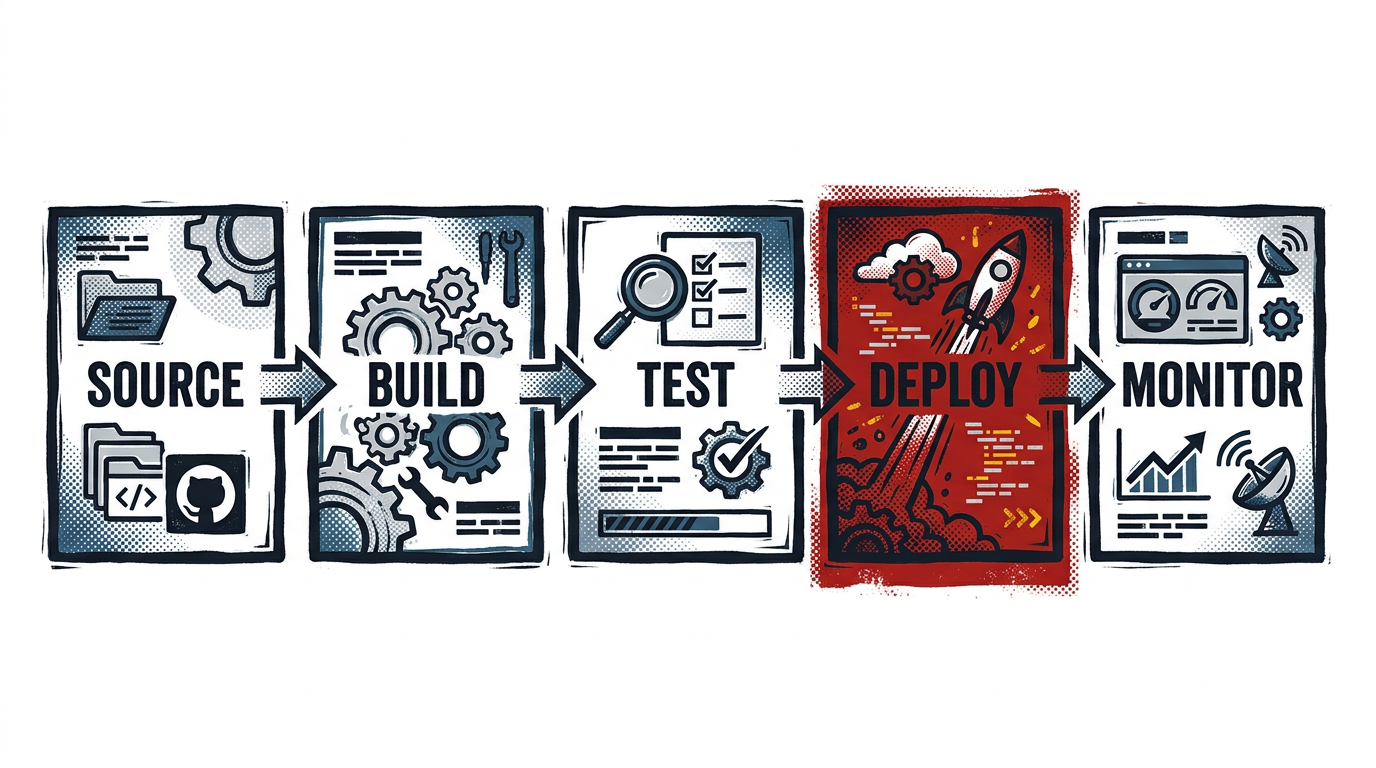
Track: DevOps. Era: every conference cycle from the mid-2000s onward. Modern lesson: the pipeline is how a team’s delivery beliefs become observable behavior.
A CI/CD pipeline is an automated path that takes a code change from a developer’s commit through build, test, packaging, and deployment, and then watches the result in production. CI handles the merge-and-verify side. CD handles the release side. Together they replace ad-hoc “ship it” rituals with a system you can describe, measure, and improve.
The recovered track
If you walked the DevOps track at almost any developer conference between roughly 2007 and 2019, you saw a recurring schedule entry: someone explaining their build pipeline, with screenshots of Jenkins, TeamCity, or a custom shell-script orchestrator. The session titles changed. The whiteboard didn’t. It always showed boxes connected by arrows, with the same questions written in the margins. How do we catch regressions before merge? How do we deploy without paging someone at 2 a.m.? Who owns the broken build?
The pipeline is the durable answer to those questions. The tools rotate. The shape of the problem does not.
What is a CI/CD pipeline, really?
A pipeline is a directed sequence of automated steps triggered by a code event, usually a push, a pull request, or a tag. Each step has a clear contract: it accepts an input artifact, runs a defined job, and either passes (handing the artifact to the next stage) or fails (stopping the line and reporting why). The goal isn’t speed for its own sake. It’s predictability. A predictable pipeline is one where the same commit produces the same result every time, and a failure tells you exactly where to look.
The canonical stages are:
- Source, a commit or merge event triggers the run; the pipeline pulls the exact ref.
- Build, compilation, dependency resolution, artifact creation (a binary, a container image, a static bundle).
- Test, unit, integration, contract, and any required security or license scans.
- Deploy to artifact registry, push the immutable build to a registry, tagged so it can be referenced exactly.
- Deploy to environment, promote that artifact through staging and production, usually with environment-specific config injected, not rebuilt.
- Monitor, observe the released change with health checks, error rates, latency, and business metrics; trigger rollback if needed.
This mirrors the Twelve-Factor App’s build, release, run separation: you build an artifact once, you release it into an environment with config, and you run it. Conflating those phases is one of the oldest sources of “works on my machine” outages.
CI vs CD vs Continuous Deployment: the three distinction
These terms get used interchangeably in job postings and vendor decks. They aren’t the same thing, and conflating them hides where a team is actually weak.
| Term | What it means | What it asks of the team |
|---|---|---|
| Continuous Integration (CI) | Every change is merged to a shared trunk frequently, with automated build + test running on each merge | Trunk-based discipline, fast and trustworthy test suite |
| Continuous Delivery (CD) | Every passing build is automatically packaged and made deployable to production, with a human button-press to release | Reliable build artifacts, environment parity, release approval workflow |
| Continuous Deployment | Every passing build automatically goes to production with no human gate | High test confidence, progressive rollout, instant rollback, strong observability |
Martin Fowler’s original write-up on Continuous Integration is still the cleanest reference for what CI actually requires, and it’s mostly team behavior, not tooling. The point of naming the distinction is that “we have CI/CD” can mean almost anything. “We auto-deploy passing main builds to staging and require a deploy approval to promote to prod” is a specific, useful statement.
What does a good pipeline look like?
Tool diagrams are easy. Honest signals are harder. The most durable way to evaluate a pipeline is to use the DORA research program’s four key metrics, published by Google Cloud and refined over a decade of survey data across thousands of engineering organizations.
- Deployment frequency, how often you successfully release to production.
- Lead time for changes, time from code commit to running in production.
- Change failure rate, percent of deploys that cause a degradation requiring remediation.
- Mean time to restore (MTTR), how long it takes to recover from a production incident.
Good pipelines push the first two up and the last two down, together. A pipeline that ships ten times a day but breaks production half the time isn’t fast. It’s noisy. Elite teams in DORA’s reports tend to deploy on demand with change failure rates under 15% and recovery times measured in under an hour. That’s the bar worth pointing at, not the marketing-page claim of “deploy in seconds.”
A practical decision rule for your team: pick one of the four metrics that’s clearly worse than the others, and spend the next two sprints fixing the part of the pipeline that owns it. Don’t try to fix all four at once.
Common pipeline anti-patterns
These show up in nearly every legacy DevOps session if you read between the slides. They’re still everywhere.
- The thirty-minute flaky test suite. When tests take long and fail randomly, developers learn to ignore them. Either fix or quarantine flaky tests on a strict schedule, and budget time to keep the suite under a real ceiling (a common rule of thumb is ten minutes from push to verdict).
- Manual approval theater. A required approval step that no human ever reads in detail is not a safety control. It’s friction with no signal. Either make the approval meaningful (an actual checklist, a real reviewer) or remove it and invest in automated checks.
- No rollback path. “We’ll fix forward” is a slogan, not a strategy. A pipeline that can deploy but can’t revert in a single command is half a pipeline. Treat rollback as a first-class deploy.
- Snowflake environments. Staging and production drift apart, so passing in staging means nothing. Codify environments. Containers, declarative infrastructure, and config injected at release time (not bake time) close most of this gap.
- Secrets in pipeline logs. Easy to do, hard to undo. Audit your runner output and use a secrets manager that masks values.
- One person who knows the YAML. When pipeline knowledge lives in one engineer’s head, every change is risky. Treat the pipeline config like any other code: review it, version it, document the non-obvious bits.
How do you actually build one?
Pick a runner first, not a tool. The runner is whatever executes your pipeline jobs, a managed CI service like GitHub Actions, GitLab CI, CircleCI, or Buster, or a self-hosted Jenkins or Tekton install. The choice matters less than the discipline you apply.
A reasonable starting pipeline, described declaratively rather than in any one vendor’s syntax:
- On push to a feature branch: run lint, unit tests, and a fast smoke build. Surface results on the pull request.
- On merge to main: run the full test matrix, build a versioned artifact (container image tagged with the commit SHA), push to your registry. Auto-deploy to a staging environment that mirrors production.
- On a release tag (or a manual approval): promote the same artifact from staging to production. Do not rebuild between environments. Use progressive rollout, canary, blue/green, or a percentage rollout, so a bad release affects a small slice first.
- Always: emit deploy events to your observability stack. Tie metrics, logs, and traces back to the release version so a regression has a clear suspect.
A team can build a working version of this in a single sprint. The next year is spent making it boring. Boring is the goal.
Monitoring and feedback loops
A deploy without monitoring is a guess. The pipeline doesn’t end at “production updated.” It ends when you can answer: did this change make things worse? Wire your release events into your dashboards, most teams now tag deploy markers on their metric graphs so spikes have an obvious correlation. Track error budget burn, not just uptime. Treat a rollback as a normal event, not a postmortem-worthy crisis. Pipelines that allow easy rollback get more reliable over time because reverts stay cheap.
If you build one feedback loop this quarter, make it this one: alert the engineer who merged the change when their deploy degrades a key metric. Most “DevOps culture” arguments come down to whether the people who ship code see the consequences of what they shipped.
What changed, and what didn’t
The tooling layer has moved roughly every five years: from Hudson and Jenkins, to Travis and CircleCI as managed cloud runners, to GitHub Actions and GitLab CI becoming the default for repositories that live on those platforms, with Tekton and Argo for Kubernetes-native pipelines. Container-native artifacts, OIDC-based cloud auth, and reusable workflow modules are now table stakes.
What didn’t change is what the old conference talks were really about: a delivery system you can describe, measure, and trust. The pipeline is the artifact. The team behavior is the lesson.
Related reading
- DevOps Lessons From Conference Tracks
- What a Modern Java Track Can Learn From Conference Archives
- How to Use a Developer Conference Archive
Sources
- “DORA research program”, Google DORA, Four key delivery metrics and the State of DevOps research base.
- “Continuous Integration”, Martin Fowler, Original definition and team-practice requirements for CI.
- “Build, release, run”, The Twelve-Factor App, The separation of build, release, and run stages.